
I am incredibly thrilled to announce that Chitra, Sanka, Binnacle and other my Open Source projects have been awarded the Fellowship Grant by FOSS United! (See details here Fellowships/2026/Aravinda VK).
This fellowship provides invaluable support that will allow me to dedicate focused time and resources to the upcoming releases. Specifically, the grant will directly fund fixing critical bugs, improving documentation, and building new features. A huge thank you to the FOSS United team for believing in these projects and for their commitment to supporting the open-source ecosystem.
I will use this page to publish the progress of the projects (See Updates). I will publish the project roadmaps and update the link here.
If you use any of these projects or are interested in helping these projects, a contribution would mean A LOT to me. With your help, continuing my work can be sustainable. Thank you for your continued support!
SPONSORS


UPDATES
-
SEP 19, 2026 . Saturday
-
serverino-params New project created for handling request params for Serverino web framework (https://github.com/aravindavk/serverino-params)
-
-
SEP 18, 2026 . Friday
-
sanka Created a new Github Organization for Sanka (Kannada projects) https://github.com/sanka-kn
-
sanka Sanka.js project started - JavaScript library for Kannada language. https://github.com/sanka-kn/sanka.js
-
sanka Rollup based build script added.
-
sanka Added support for Splitting text into Kannada letters.
-
sanka Added support for checking and listing Palindrome words.
-
sanka Added support for finding N letter words.
-
sanka Added support for converting english to Kannada numbers and vice versa.
-
sanka Added support for shuffle.
-
-
SEP 17, 2026 . Thursday
-
tinyview Matched the APIs similar to Jinja. Added support for passing template variables via arguments (Repo: https://github.com/aravindavk/tinyview)
-
-
SEP 16, 2026 . Wednesday
-
jinja-d Simplified the APIs (Repo: https://github.com/aravindavk/jinja-d)
-
-
SEP 10, 2026 . Thursday
-
Chitra Added a template project so that
dub init -t chitrawill initialize the Chitra project. -
Chitra Close path after drawing oval/circle.
-
-
SEP 09, 2026 . Wednesday
-
Chitra New Github organization created for Chitra project. Website work started https://chitra-2d.github.io (Repo: https://github.com/chitra-2d/chitra-2d.github.io)
-
-
SEP 06, 2026 . Sunday
-
Chitra Exposed
ctx.colorcommand to generate Color object -
Chitra New feature: Added support for drawing tables
-
-
AUG 27, 2026 . Thurssday
-
Chitra Added documentation for QR code images (https://github.com/aravindavk/chitra-d/wiki/QR-Code-Image)
-
Chitra Added more examples to Chitra illustrations repo.
-
-
AUG 26, 2026 . Wednesday
-
Chitra Added documentation for Animation (https://github.com/aravindavk/chitra-d/wiki/Animation)
-
-
AUG 25, 2026 . Tuesday
-
Chitra New feature Added support for creating animations.
-
Chitra Added commands to customize Animation options frame rate, loop and others.
-
-
AUG 19, 2026 . Wednesday
-
Tinyview Rewrite Tinyview without using Regex.
-
Chitra Integrate Tinyview library for page and document variables.
-
-
AUG 17, 2026 . Monday
-
Chitra Page and document variables support added for text element.
{{ currentPage }}and{{ totalPages }}variables available by default for PDFs.
-
-
AUG 16, 2026 . Sunday
-
Chitra Make the height of the
Boxasauto. Creates a square box if the height is not specified. -
Chitra QR code poster added to illustrations repo.
-
-
AUG 13, 2026 . Thursday
-
Chitra Fix the text color issue if not specified in the default TextStyle.
-
-
AUG 12, 2026 . Wednesday
-
Chitra New feature Added support for QR code images.
-
Chitra Added new command
namedColors()to list the colors.
-
-
AUG 06, 2026 . Thursday
-
Chitra Added support for drawing grid outlines (
gridOutlines()) -
Chitra Grid and Text documentation updated with illustrations.
-
Chitra Gallery page updated with image and source linked to the new illustrations repo.
-
-
AUG 05, 2026 . Wednesday
-
Chitra Fix drawing the transparent text (
noFill). Pango Markup alpha attribute was required when no color was used. -
Chitra Created a new repo for the illustrations needed for Documentation and Gallery https://github.com/aravindavk/chitra-docs-illustrations
-
-
AUG 04, 2026 . Tuesday
-
Chitra Syntax highlighting support added to the
textcommand using Python Pygments.
-
-
AUG 01, 2026 . Saturday
-
Chitra New blog post added: "Paper Elephant - Chitra" https://aravindavk.in/blog/paper-elephant-chitra
-
-
JUL 31, 2026 . Friday
-
Chitra Added support for Text styles to create reusable styles.
-
Chitra Color parsing improvements: Removed the duplicate code for parsing color (Used by
fill,stroke,background,borderColoretc) -
Chitra Use
fillcolor astextColorand removed thetextColorcommand.
-
-
JUL 29, 2026 . Wednesday
-
Chitra Documentation moved to Github Wiki https://github.com/aravindavk/chitra-d/wiki
-
-
JUL 28, 2026 . Tuesday
-
Chitra Fixed the point implementation by drawing zero length line instead of drawing a very small circle. Now the Point color is controlled by Stroke. Fill has no effect. Adjust the size of the line using
strokeWeightcommand. -
Chitra (Lua-plugin) Added support for Bezier and path commands.
-
-
JUL 26, 2026 . Sunday
-
Chitra Enhanced the drawing commands (
oval,rect,lineetc) to accept XY coordinate as Point object. -
Chitra Added support for drawing Bezier curves.
-
Chitra Added Vase example using Bezier curves. Added support to highlight points and the control points.
-
Chitra Added Car example using Bezier and line paths.
-
Chitra Added Path example.
-
Chitra Updated the Drawing context document.
-
Chitra Updated the Exporting document.
-
-
JUL 25, 2026 . Saturday
-
Chitra Fix the issue with background color scaling when gray scale was used.
-
-
JUL 24, 2026 . Friday
-
Chitra Added illustrations to Coordinate system document.
-
-
JUL 23, 2026 . Thursday
-
Chitra Added support for drawing arc.
-
Chitra Added support for
angleMode(DEGREES|RADIANS)to switch between degrees and radians. Default is Radians. -
Chitra Added helper functions for degrees and radians (Ex:
45.degrees, TWO_PI.radians).
-
-
JUL 22, 2026 . Wednesday
-
Chitra
blendModesupport added to mix the two drawings in different blend modes (Intersection, Union, Multiply etc). -
Chitra
saveStateandrestoreStatecommands added. These commands help to isolate the changes only to a set of commands. For example, transformation APIs. -
Chitra
strokeDashorlineDashsupport added. -
Chitra
strokeJoinorlineJoinsupport added. -
Chitra
strokeCaporlineCapsupport added. -
Chitra Added a new named color: "sapphireblue"
-
Chitra Added support for drawing Triangle.
-
-
JUL 16, 2026 . Thursday
-
Chitra New blog post: "Perfect Fit Every Time: Automatically Resize Text" https://aravindavk.in/blog/auto-resize-text-chitra
-
-
JUL 15, 2026 . Wednesday
-
Chitra Box transformation utilities added (
combine,shift,intersect,inset) -
Chitra Text properties commands added:
fontSize,font,textAlignetc
-
-
JUL 14, 2026 . Tuesday
-
Chitra Added
fit,offset_xandoffset_yargs to the background and image APIs. -
Chitra New blog post: "Half-Tinted Magic: How to Add a Color Tint to Just Part of an Image" https://aravindavk.in/blog/half-tinted-magic
-
-
JUL 12, 2026 . Sunday
-
Chitra New blog post about Tinted images https://aravindavk.in/blog/tinted-images
-
Chitra Available Chitra APIs (Lua plugin):
dist,image,width,height.
-
-
JUL 11, 2026 . Saturday
-
Chitra New blog post about Distance between two points https://aravindavk.in/blog/distance-between-two-points
-
-
JUL 10, 2026 . Friday
-
Chitra Started working on the Lua plugin. Created a new repository for the same. First version, initializes the context and supports many Chitra APIs.
-
Chitra Chitra CLI is made available that accepts file or code as argument.
./chitra -f examples/color_grid.lua ./chitra -c 'size(100);fill("green");no_stroke();rect(0, 0, 100);save("success.png", {resolution=72})' -
Available Chitra APIs (Lua plugin):
size,save,grid,grid_cell,grid_area,rect,oval,oval_mode,color_scale,fill,stroke,no_fill,no_stroke,stroke_width,background,tint,no_tint,text_font,text_size,overflow_text,text,new_drawing,new_page,square,circle.
-
-
JUL 09, 2026 . Thursday
-
Chitra Added support for drawing the text within a bunding box and a new method to get the overflow text.
text(txt, 100, 100, 400, 200); auto extra = overflowText; text(extra, 600, 100, 400, 200); -
Chitra Chitra v0.4.1 release https://github.com/aravindavk/chitra-d/releases/tag/v0.4.1
-
-
JUL 05, 2026 . Sunday
-
Chitra Added support for
textSizeto get the width and height of the text before rendering (Chitra draws text in the default hidden canvas and gets the size of the text).Align the text to centerauto box = textSize("Hello World!"); auto x = (width - box.width) / 2.0; auto y = (height - box.height) / 2.0; text("Hello World!", x, y);
-
-
JUL 04, 2026 . Saturday
-
Chitra Added support to fit the image to the given bounding box. Supported image fittings are:
FILL,CROP,CONTAIN,COVER.
-
-
JUL 02, 2026 . Thursday
-
Chitra Most awaited feature to arrange/draw elements as grid. Chitra now supports creating unlimited named grids and an easy way to access grid cell or area.
grid(4, 2);  // Creates a virtual grid with 4 columns and 2 rows
// Set the size of the grid
gridSize(20, 20, width - 40, height - 40);
// Draw a rectangle in grid cell 2
auto box = gridCell(2);
rect(box.x, box.y, box.width, box.height); // Same as `rect(box);`
// Draw a rectangle using two grid cells 2 and 3
box = gridArea(2, 3);
rect(box.x, box.y, box.width, box.height); // Same as `rect(box);`
To create a sub grid or named grid
grid(2, 2); // Main grid with 2 columns and 2 rows. // Create a subgrid (divide first grid cell of main grid into 4 columns and 2 rows) auto cell1 = gridCell(1); grid("sub1", 4, 2); auto box1 = gridCell("sub1", 1); // First cell of sub-grid -
Chitra Added a few examples (Gallery): Rainbow background and UUID thumbnail using grid
-
Chitra Chitra v0.4.0 release https://github.com/aravindavk/chitra-d/releases/tag/v0.4.0
-
-
JUN 30, 2026 . Tuesday
-
JUN 29, 2026 . Monday
-
SimpleQueue(D) Modified the library to use only Postgres database. Database schema is inspired by Rails/SolidQueue project. Used
SELECT … FOR UPDATE SKIP LOCKEDfeature of Postgres to pick the task without duplicating between other workers (link).
-
-
JUN 25, 2026 . Thursday
-
DataFrames(D) Added support to create DataFrame from the JSON input (link).
-
-
JUN 23, 2026 . Tuesday
-
Kannada Added support to build the JavaScript compatible to NodeJS and Browser using rollup (link).
-
-
JUN 18, 2026 . Thursday
-
Chitra Utility function (
findDistance(x1, y1, x2, y2)) added to find the distance between two points (link). -
Chitra Fix zero width or height oval bug. Due to this context scale was set to zero and no further shapes were drawn (link).
-
Chitra Gallery home page and gallery detail page added. Also added the sort order to rank the Gallery entry (link).
-
Chitra Added Makefile and bash script to generate the Gallery images and its thumbnails (link).
-
Chitra Source code of the Gallery is saved as separate file so that managing or updating code becomes easy (link).
-
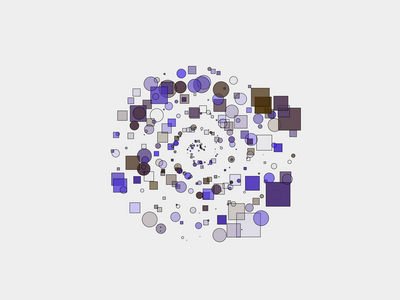
Chitra Added Gallery example: Background (link).

-
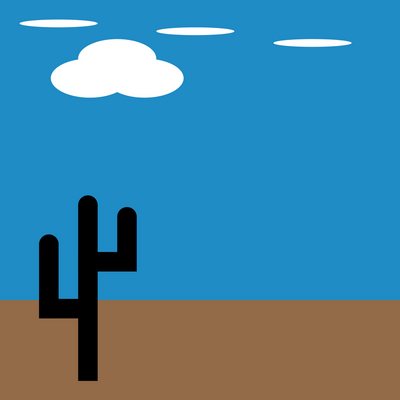
Chitra Added example: Clouds (link).
-
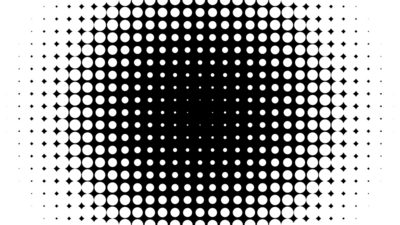
Chitra Added example: Distance (link).
-
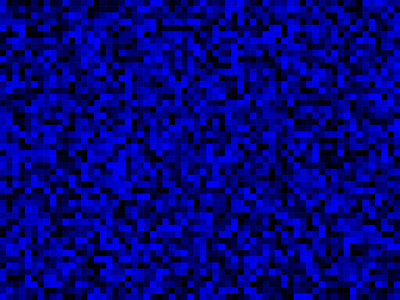
Chitra Added example: Random blues (link).
-
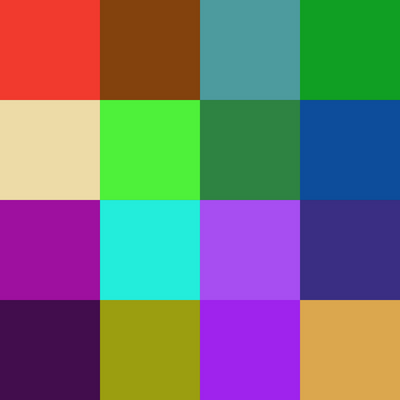
Chitra Added example: UUID Thumbnail (link).
-
-
JUN 16, 2026 . Tuesday
-
Chitra Added new feature to control the co-ordinates and dimentions while drawing the oval/circle shapes (link).
ovalMode(CENTER);
//   X    Y    W    H
oval(100, 100, 100, 100);

ovalMode(RADIUS);
//   X    Y    R1  R2
oval(100, 100, 50, 50);

ovalMode(CORNER);
//   X   Y   W    H
oval(50, 50, 100, 100);

ovalMode(CORNERS);
//   X   Y   X2   Y2
oval(50, 50, 150, 150);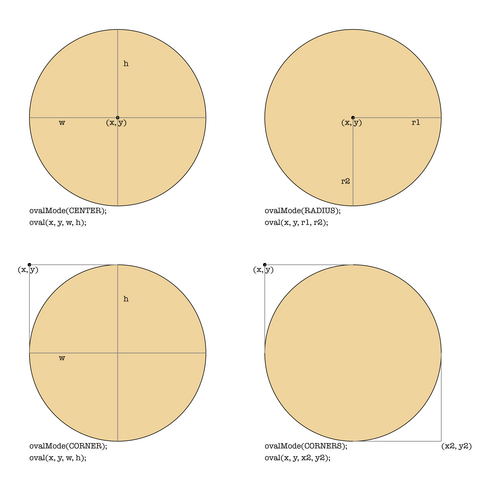
-
-
JUN 15, 2026 . Monday
-
Chitra Added Jekyll based documentation website under
docsdirectory. Theme and documentation work is in progress (link1, link2 and link3). -
Chitra Added image tint feature (link).
tint("red");
image("tiger.png", 0, 0);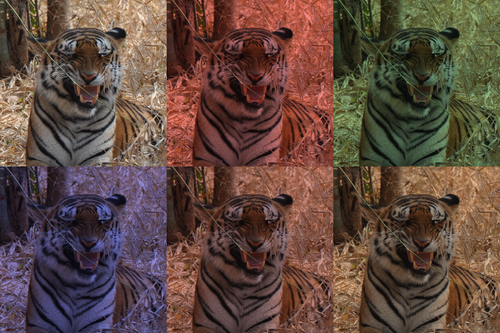
-
Chitra Fix image scale when output resolution changes. Image scale was not changed when the canvas resolution changes. For example the following example draws only in 25% of the canvas size because paper size almost increased to 4 times when the default resolution changed to 300 from 72 (link).
auto ctx = new Chitra(600);
ctx.image("img_600.png", 0, 0);
ctx.saveAs("output.png", resolution: 300);
With this fix the above will render 600px image to full paper width. Works with any resolution setting.
-
-
JUN 12, 2026 . Friday
-
Dataframes(D) Added
shiftfeature to shift the column values as needed by giving the required number of jump value. Negative jump value will shift the column values in reverse order (link).auto c1 = Column!int([10, 20, 30, 40, 50]); writeln(c1.shift(1)); // Shifts index by 1 => [0, 10, 20, 30, 40] writeln(c1.shift(-1)); // Reverse Shifts index by 1 => [20, 30, 40, 50, 0]Sets the default value of respective type (Ex:
nanfor double,""for string etc) when shifted.To find the average of the last two values:
auto c1 = Column!int([10, 20, 30, 40, 50]); auto avgCol = (c1 + c1.shift(1)) / 2; writeln(avgCol); -
Chitra Fixed the translate API example. To reset the translate value used earlier it was using the negative number, but since the data type was wrongly used as
ulongnegative values were casted to something unexpected (link).// X Y translate(100, 100); // Move to (100, 100) rect(0, 0, 200, 50); translate(-100, -100); // Move back to original position -
Chitra Set the default text color to Black. Earlier it was taking the previously used color while drawing any other shape (link).
-
Chitra Fix the traffic light example by generating multiple drawings (output images) using the
newDrawingAPI (link). -
Chitra Added example of using the
scaleAPI (Increase or decrease the scale) (link).
-
-
JUN 11, 2026 . Thursday
-
Chitra Chitra context management using Lua
lightuserdata. This helps to use Chitra with multiple threads using Lua plugin. -
Chitra Expose
setSizefunction to use with Lua plugin. When Lua plugin is used, no need to initialize the Chitra context, by specifyingsize(w, h)the canvas size can be customized. Documentation is not yet available to use the Lua plugin (link).
-
-
JUN 06, 2026 . Saturday
-
JUN 04, 2026 . Thursday
-
Chitra Added two examples, Traffic signal and Text (https://github.com/aravindavk/chitra-d/commit/894b47b7e7cfef259abf7624962bd29741525cf1).

-
-
JUN 03, 2026 . Wednesday
-
Chitra Added FOSS United logo as Sponsor to Github project page of Chitra (link).
-
Chitra Added the new feature to customize the color inputs. Some prefer
0-255color codes and some prefer floating values from0-1.0. Chitra now supports chosing the color scale as needed. Default color scale is0-255for RGB values and0-1.0for Alpha (Opacity control) (link).// RGB A colorScale(255, 1); // Default scale // R G B A fill(0, 0, 255, 0.5); // Blue with Opacity 50% colorScale(255, 255); fill(0, 0, 255, 127); // Blue with Opacity 50%
-
-
JUN 02, 2026 . Tuesday
-
Chitra Added
borderandborderColorAPIs. Border supports thikness, margin, radius and color (link).borderColor("blue"); border(5, margin: 10, radius: 7);
-