
auto size = ctx.textSize("Hello World!");
auto x = (ctx.width - size.width) / 2.0;
auto y = (ctx.height - size.height) / 2.0;
ctx.text("Hello World!", x, y); // Render text center aligned (Vertical and Horizontal)Perfect Fit Every Time: Automatically Resize Text
Jul 16, 2026
1 minute read.
d
dlang
chitra
lua
Often, we have a fixed space for the text, and it becomes tedious to adjust its size based on the content and available space. Chitra provides a command to get the text size before drawing. This will be very useful to arrange the text vertically or horizontally.
In this tutorial, we will start with the maximum text size and iteratively check whether it fits; if not, reduce the text size and check again. Once it reaches the minimum size, then stop it and cut the text to fit the bounding box.
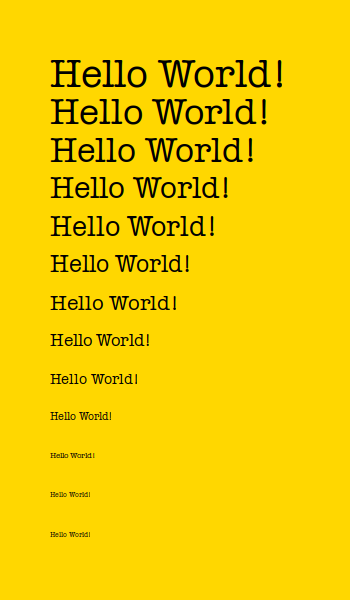
In the above example, single-line text was used, so the text width was compared. When a text box is used (with width and height), compare the box height with the container height.
Source:
#!/usr/bin/env dub
/+ dub.sdl:
 dependency "chitra" version="~>0.4.0"
 +/
import chitra;

void autoText(Chitra ctx, string txt, double x, double y, double w)
{
    auto rendered = false;
    double minSize=5.0;
    double maxSize=30.0;

    foreach_reverse(i; minSize .. maxSize + 1)
    {
        ctx.textFont("American Typewriter", i);
        auto box = ctx.textSize(txt);

        if (box.width < w)
        {
            rendered = true;
            ctx.text(txt, x, y, box.width, box.height);
            break;
        }
    }

    if (!rendered)
    {
        ctx.textFont("American Typewriter", minSize);
        ctx.text(txt, x, y);
    }
}

void main()
{
    auto ctx = new Chitra(350, 600);
    with (ctx)
    {
        noStroke;
        background("#ffd700");
        textFont("American Typewriter");

        saveAs("auto-text.png", resolution: 72);

        // Reduce the width by 20 points and check if it fits
        foreach(i; 0 .. 13)
            ctx.autoText("Hello World!", 50, 50 + 40 * i, 250 - i * 20);

        saveAs("auto-fit-text.png", resolution: 72);
    }
}
About Aravinda VK
Partner at Kadalu Investments, Creator of Sanka, Creator of Chitra, GlusterFS core team member, Maintainer of Kadalu Storage